> ## Documentation Index
> Fetch the complete documentation index at: https://docs.mindset.ai/llms.txt
> Use this file to discover all available pages before exploring further.
# Enabling Agent Memory
> Steps to enable agent memory in your Agent Management Studio
Agent Memory allows agents to collect, store, and share user facts across different conversations and agents within your application. This creates a more personalized experience where agents can remember user preferences, information, and context from previous interactions.\
\
**Important Note:** Agent Memory is currently in **BETA** and is subject to change. Fact collection guidance is experimental, and effectiveness may vary.
## Step 1: Enable Beta Features
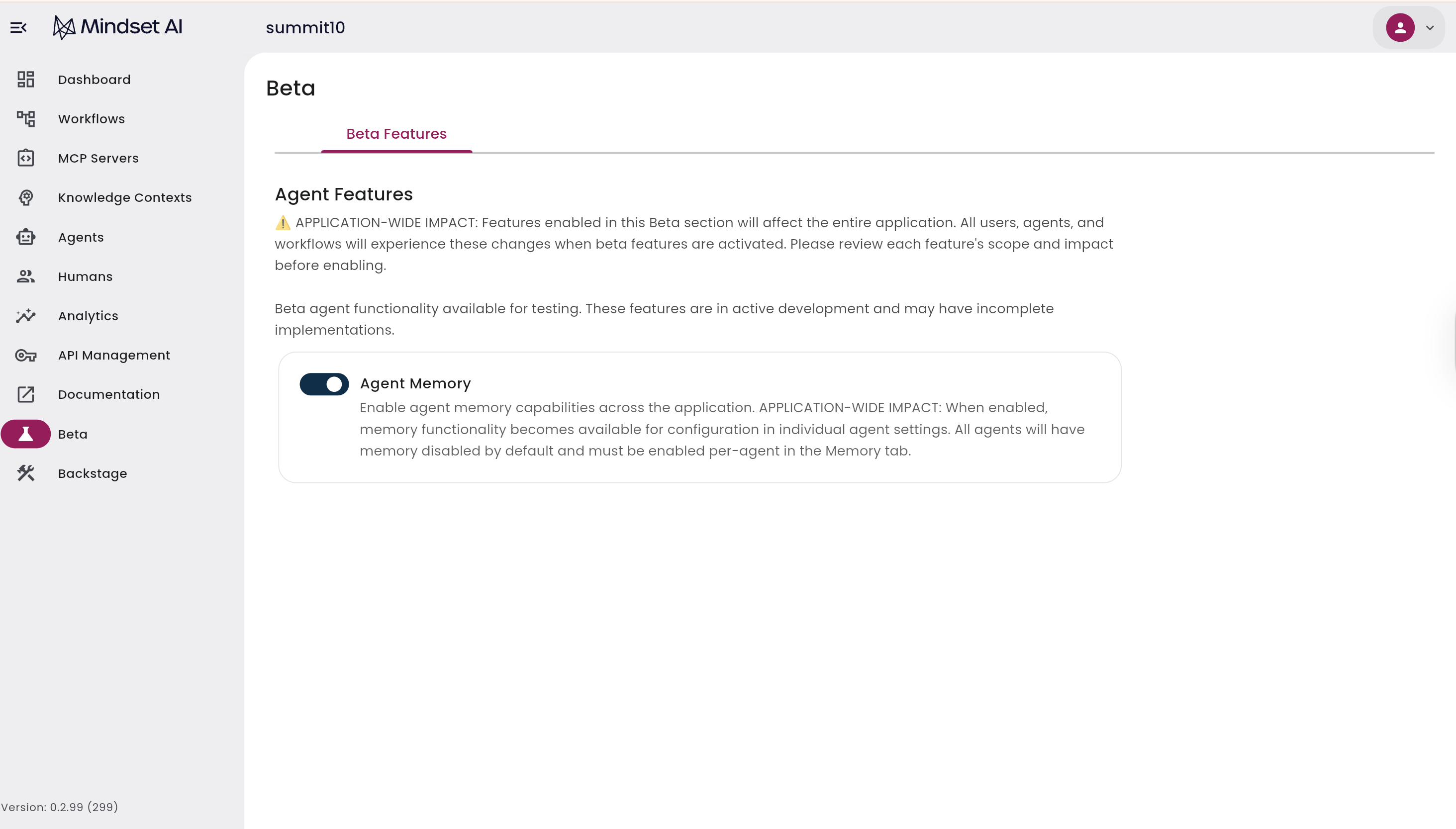
1. Navigate to the **Beta** section in the left sidebar of your Agent Management Studio dashboard.
2. Locate **Agent Memory** in the list of available beta features.
3. Toggle the switch to **ON** to enable Agent Memory for your application.
4. Click **Save** on the top right corner.
 ## Step 2: Configure Global Agent Memory Settings
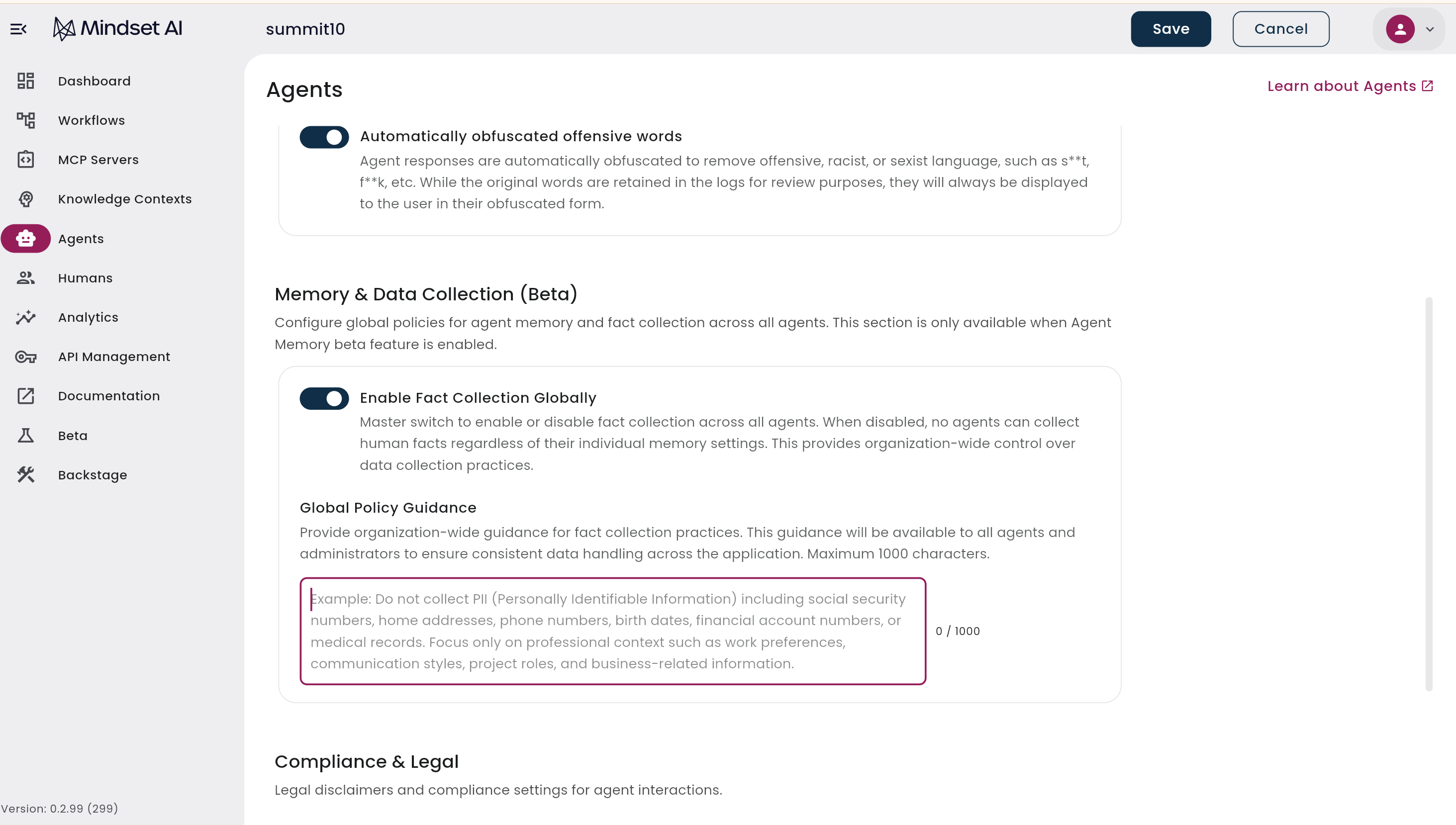
This step configures Agent Memory and fact collection **across all agents**. This section is only available when the Agent Memory beta feature is enabled.
1. Go to **Agents > Global Agent Configuration** in your dashboard.
2. Find the switch labeled **Enable Fact Collection Globally**.
3. Toggle this switch to **ON**.
4. Add **Global Policy Guidance** to set boundaries for fact collection. This ensures consistent data handling across all agents.
Example Guidance: Never collect personal addresses, age, or bank information.
## Step 2: Configure Global Agent Memory Settings
This step configures Agent Memory and fact collection **across all agents**. This section is only available when the Agent Memory beta feature is enabled.
1. Go to **Agents > Global Agent Configuration** in your dashboard.
2. Find the switch labeled **Enable Fact Collection Globally**.
3. Toggle this switch to **ON**.
4. Add **Global Policy Guidance** to set boundaries for fact collection. This ensures consistent data handling across all agents.
Example Guidance: Never collect personal addresses, age, or bank information.
 ## Step 3: Enable Memory for Individual Agents
This step configures memory for a specific agent and determines how it handles shared memory.
1. Navigate to your **Agents list**.
2. Select the agent you want to enable memory for (or create a new test agent).
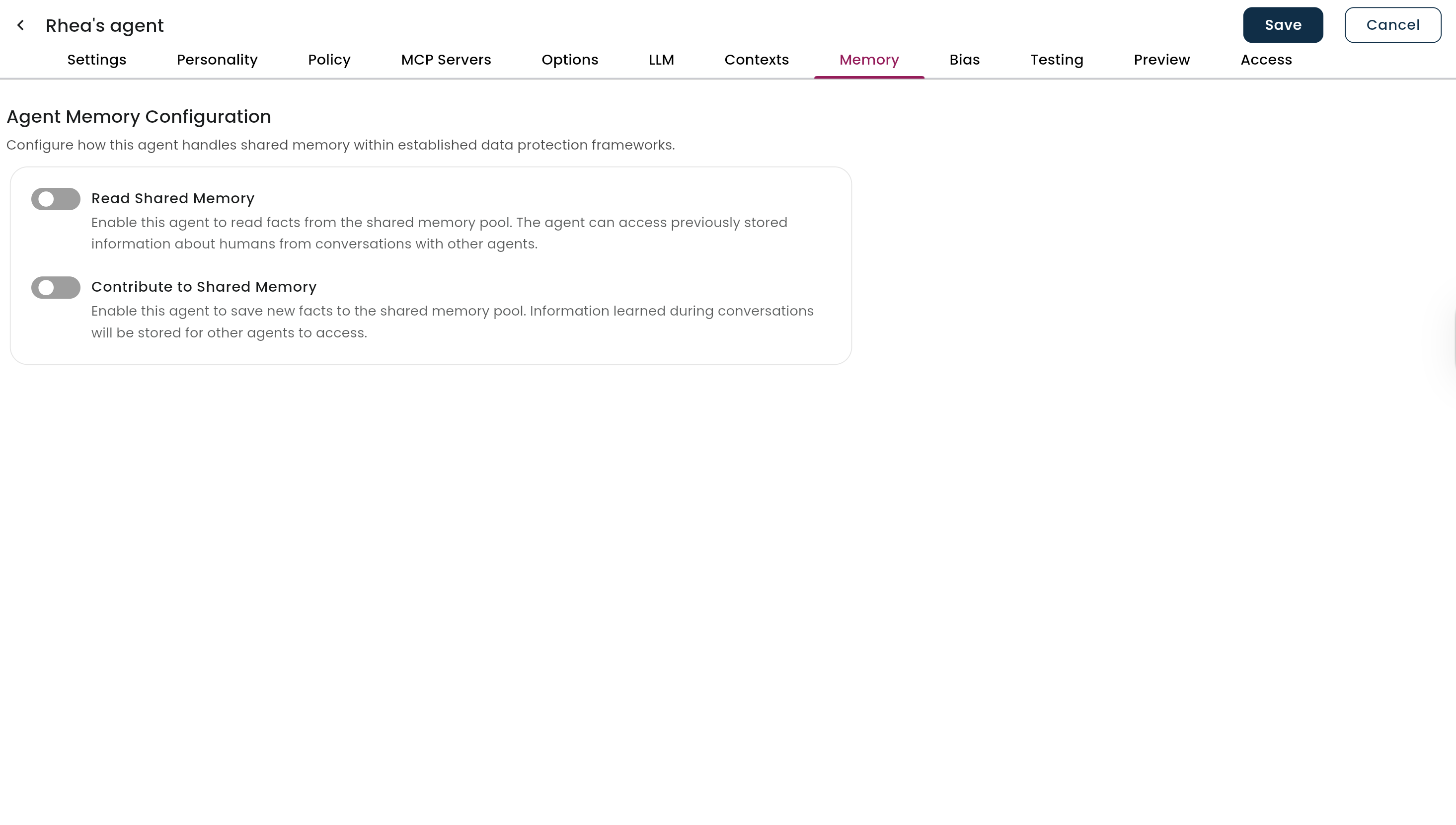
3. A new **Memory** tab will appear at the top of the agent configuration.
4. Click the **Memory** tab.
5. Configure the memory settings with the following options:
## Step 3: Enable Memory for Individual Agents
This step configures memory for a specific agent and determines how it handles shared memory.
1. Navigate to your **Agents list**.
2. Select the agent you want to enable memory for (or create a new test agent).
3. A new **Memory** tab will appear at the top of the agent configuration.
4. Click the **Memory** tab.
5. Configure the memory settings with the following options:
 ### Memory Configuration Options
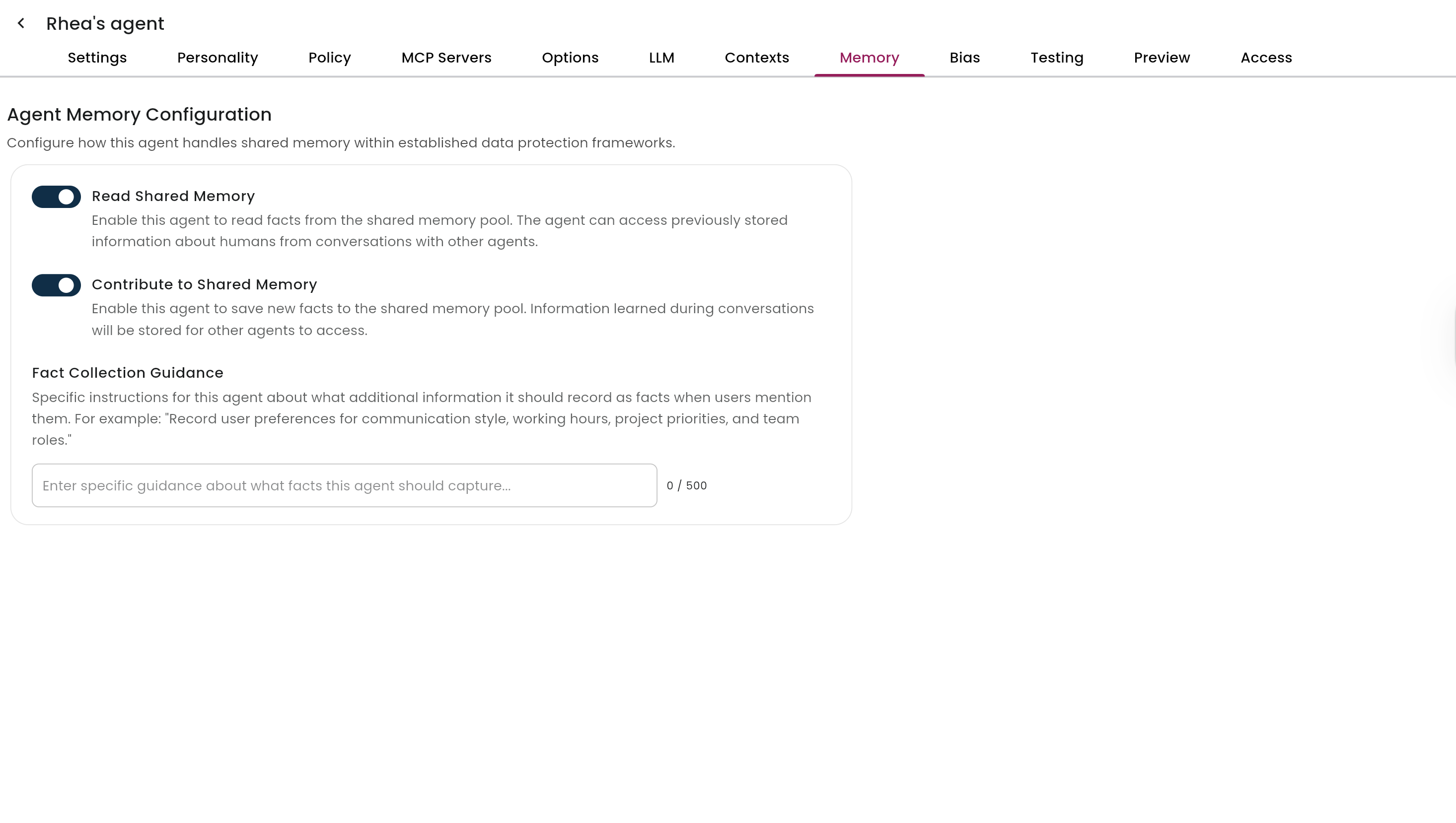
* **Contribute to Shared Memory (Fact Collection)**
* Toggle **ON** to allow this agent to collect and store user facts.
* Facts are stored in a shared pool accessible by other memory-enabled agents.
* **Read Shared Memory**
* Toggle **ON** to allow this agent to access previously collected user facts.
* This enables more personalized responses across agents.
### Agent-Specific Fact Collection Guidance
* Example: *"Focus on collecting career-related information."*
* Example: *"Record user’s food preferences when mentioned."*
### Memory Configuration Options
* **Contribute to Shared Memory (Fact Collection)**
* Toggle **ON** to allow this agent to collect and store user facts.
* Facts are stored in a shared pool accessible by other memory-enabled agents.
* **Read Shared Memory**
* Toggle **ON** to allow this agent to access previously collected user facts.
* This enables more personalized responses across agents.
### Agent-Specific Fact Collection Guidance
* Example: *"Focus on collecting career-related information."*
* Example: *"Record user’s food preferences when mentioned."*
 ## Monitor and Manage User Facts
1. Navigate to **Humans > All Humans**.
2. Select a user who has interacted with memory-enabled agents.
3. Click on the **Agent Memory** tab to view collected facts.
## Monitor and Manage User Facts
1. Navigate to **Humans > All Humans**.
2. Select a user who has interacted with memory-enabled agents.
3. Click on the **Agent Memory** tab to view collected facts.
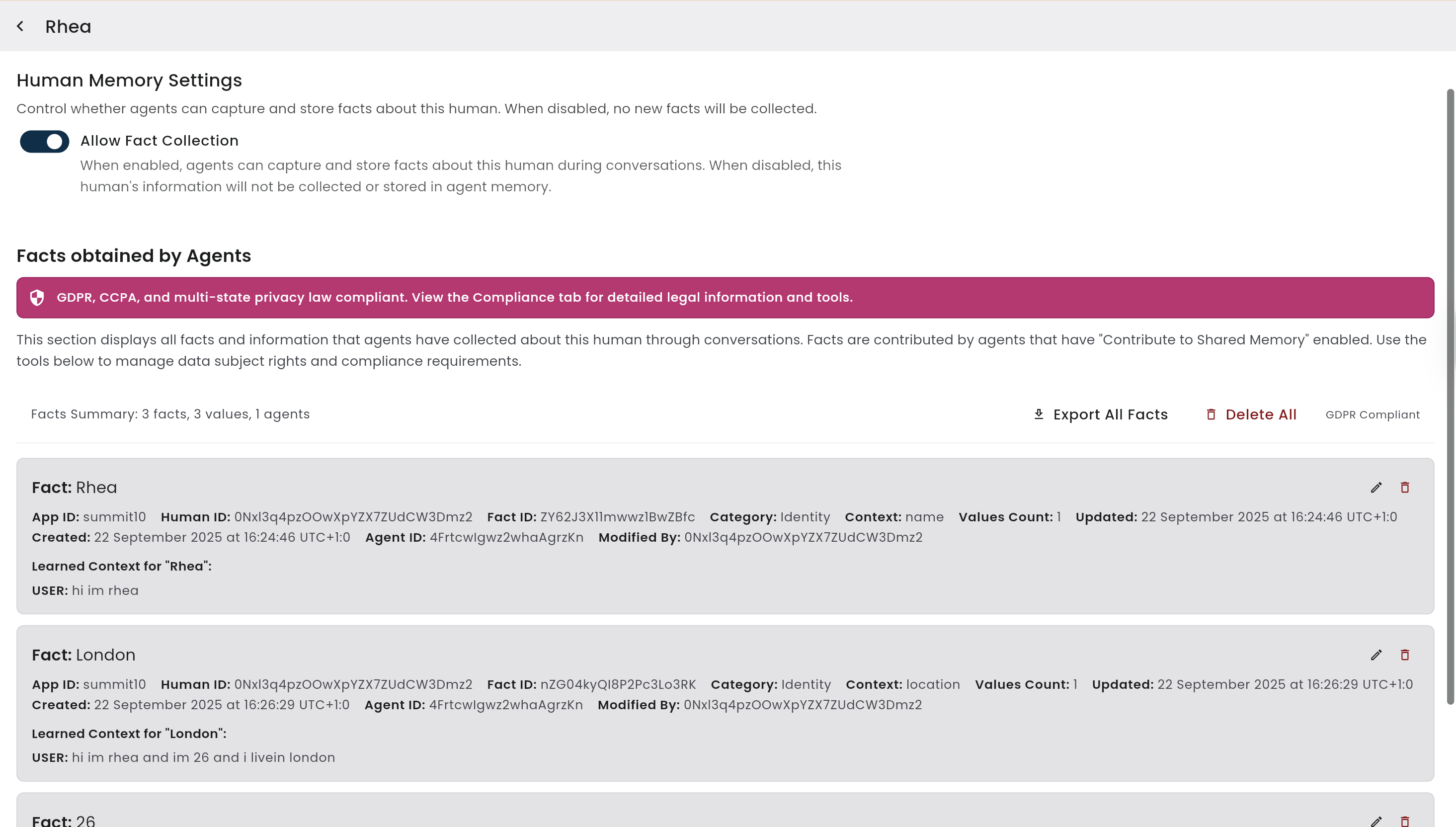 ### Available Actions
* View all facts collected about the user.
* Edit individual facts if corrections are needed.
* Delete specific facts that are no longer relevant.
* Export all facts for data portability (**GDPR compliance**).
* Delete all facts to completely clear a user’s memory profile.
* Disable fact collection for individual users using the toggle switch.
## Important Notes
### Privacy and Compliance
* All users currently have fact collection automatically enabled when Agent Memory is turned on.
* Admins can opt individual users out.
* User opt-in/opt-out functionality is planned for future releases.
* The **Agent Memory** tab remains visible on user profiles (even if disabled) for compliance purposes.
### Memory Persistence
* Facts are shared across all memory-enabled agents **per user** (not across different users).
* If you disable Agent Memory, previously collected facts remain accessible for compliance.
* The **Memory** tab disappears from agent configurations when memory is disabled globally but remains on user profiles.
## Troubleshooting
**Memory tab missing from agents**
* Ensure the Beta feature is enabled.
* Check that the Global Agent Config switch is turned on.
**Facts are not being collected**
* Verify both Beta and Global switches are enabled.
* Ensure the agent has **Contribute to Shared Memory** enabled.
* Look for the lightbulb indicator during conversations.
**Facts not shared between agents**
* Ensure both agents have memory enabled.
* Check that the receiving agent has **Read Shared Memory** enabled.
### Available Actions
* View all facts collected about the user.
* Edit individual facts if corrections are needed.
* Delete specific facts that are no longer relevant.
* Export all facts for data portability (**GDPR compliance**).
* Delete all facts to completely clear a user’s memory profile.
* Disable fact collection for individual users using the toggle switch.
## Important Notes
### Privacy and Compliance
* All users currently have fact collection automatically enabled when Agent Memory is turned on.
* Admins can opt individual users out.
* User opt-in/opt-out functionality is planned for future releases.
* The **Agent Memory** tab remains visible on user profiles (even if disabled) for compliance purposes.
### Memory Persistence
* Facts are shared across all memory-enabled agents **per user** (not across different users).
* If you disable Agent Memory, previously collected facts remain accessible for compliance.
* The **Memory** tab disappears from agent configurations when memory is disabled globally but remains on user profiles.
## Troubleshooting
**Memory tab missing from agents**
* Ensure the Beta feature is enabled.
* Check that the Global Agent Config switch is turned on.
**Facts are not being collected**
* Verify both Beta and Global switches are enabled.
* Ensure the agent has **Contribute to Shared Memory** enabled.
* Look for the lightbulb indicator during conversations.
**Facts not shared between agents**
* Ensure both agents have memory enabled.
* Check that the receiving agent has **Read Shared Memory** enabled.