> ## Documentation Index
> Fetch the complete documentation index at: https://docs.mindset.ai/llms.txt
> Use this file to discover all available pages before exploring further.
# Agent and Knowledge Context Provisioning
> Provision access to Agents and Knowledge Contexts via Agent Sessions
Here’s a guide to create agent sessions with programmatically provisioned Knowledge Contexts.
And then embed a programmatic agent in your web application using those agent sessions.
## Default agent system
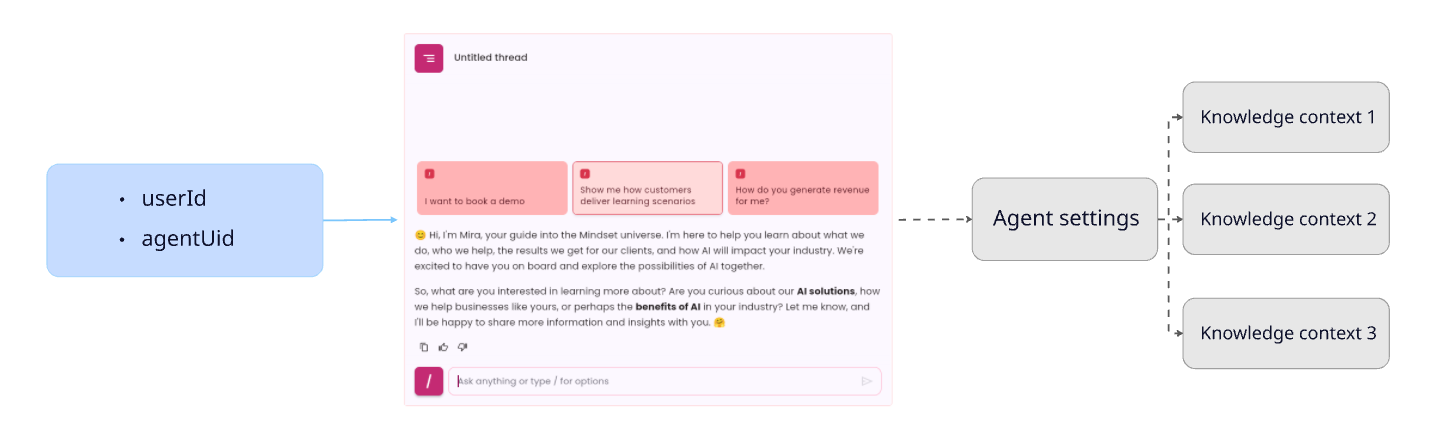
With the default agents system, your Mindset App admin dashboard manages access permissions for knowledge contexts assigned on an agent basis.
Learn more about [knowledge contexts and default agents system](/features/build/contexts).
 ## Knowledge Context Provisioning System
You may need to provision agents and knowledge contexts access based on the permission system set up in your platform.
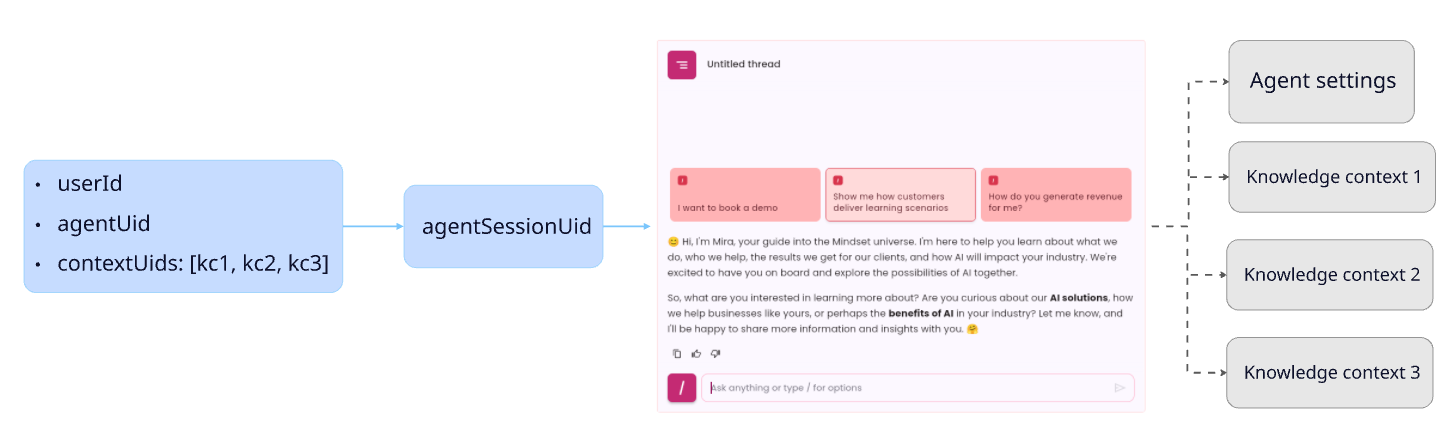
We’ve introduced the concept of an **agent session**: Agent sessions are programmatically provisioned on-demand for specified agents and knowledge contexts.
Once an **agent session** is created, providing the `agentSessionUid` to the `` HTML tag will allow you to embed the agent with the specified access permissions.
Learn more about [AgentSession and Multi-tenancy](/amp/Multi-tenancy).
## Knowledge Context Provisioning System
You may need to provision agents and knowledge contexts access based on the permission system set up in your platform.
We’ve introduced the concept of an **agent session**: Agent sessions are programmatically provisioned on-demand for specified agents and knowledge contexts.
Once an **agent session** is created, providing the `agentSessionUid` to the `` HTML tag will allow you to embed the agent with the specified access permissions.
Learn more about [AgentSession and Multi-tenancy](/amp/Multi-tenancy).
 ## Tutorial : Create agent sessions and embed an agent with provisioned knowledge contexts
### Required parameters
You will need to get a few parameters before starting.
**YOUR-APP-UID** is provided by the Mindset support team. All others parameters can be found in the Mindset Management Portal.
| Parameter | Description |
| :------------------------- | :--------------------------------------------------------------------------------------------------------------------------------- |
| **YOUR-APP-UID** | Your appUid is provided by mindset. |
| **YOUR-MINDSET-API-KEY** | Your Mindset API key. It is used to authenticate your API calls. |
| **AGENT-UID** | The agent Uid you want the user chat with. You can find that Agent Uid in the setting of the agent in the Agent Management Portal. |
| **KNOWLEDGECONTEXT-1-UID** | One Knowledge context Uid you want to provision the agent with |
| **KNOWLEDGECONTEXT-2-UID** | Another one Knowledge context Uid you want to provision the agent with |
| **MINDSET-API-HOST** | The Mindset API host. Used to call the Mindset API. |
### Step 1: Create an agent session
To create an **Agent Session** (and hence generate an `agentSessionUid` required by the SDK), you will need to call the Mindset `agentSessions API`. (See the [Agent Sessions API documentation](/sdk-api/api/agentsessions-api) for more details).
You would need to manage multiple **agents**, **knowledge contexts** and **users** on your platform.
According to your permissions and roles system, `users` would have specific rights to access specific agents and specific Knowledge contexts
For example:
* A `User1` has the permission to use the `agent1` provisioned with the `Knowledge Context 1` and `knowledge context 2`.
* But a `User2` has the permission to use the `agent1` provisioned with the `Knowledge Context 1`
Based on your permissions rules you will then create `agent sessions`.
What we would like to achieve is :
* to provision the agent (`agentUid v8srU0hv88BeWBDcirSm`)
* with the 2 knowledge contexts (`contextUids [qZJGsjytbM5fL15sfBui`, `3am8rolEPXx3j0n132Bf`])
* and for a user with an `externalUserId` (`user-x123456`).
We would need to provide the following parameters in the request body:
```javascript theme={null}
const requestBody = {
{
agentUid: "v8srU0hv88BeWBDcirSm",
externalUserId: "user-x123456",
contextUids: ["qZJGsjytbM5fL15sfBui", "3am8rolEPXx3j0n132Bf"]
}
};
```
Below is an example of an HTTP POST request to create that agent session.
```javascript theme={null}
// Example Node.js code to make a server-side HTTP POST request for creating an agent session
// Adapt this example based on your server-side programming environment
const fetch = require('node-fetch');
const YOUR-MINDSET-API-KEY = 'YOUR-MINDSET-API-KEY'
const MINDSET-API-HOST = 'MINDSET-API-HOST'
const YOUR-APP-UID = 'YOUR-APP-UID'
const requestBody = {
{
agentUid: "v8srU0hv88BeWBDcirSm",
externalUserId: "user-x123456",
contextUids: ["qZJGsjytbM5fL15sfBui", "3am8rolEPXx3j0n132Bf"]
}
};
fetch('https://${MINDSET-API-HOST}/api/v1/appuid/${YOUR-APP-UID}/agentsessions', {
method: 'POST',
headers: {
'Content-Type': 'application/json',
'x-api-key': YOUR-MINDSET-API-KEY
},
body: JSON.stringify(requestBody)
})
.then(response => response.json())
.catch((error) => {
console.error('Error:', error);
});
```
The API response object will be:
```json theme={null}
{
"uid": "uFKbuW0ipk2Za4QuQ6rx",
"createdAt": "2025-06-10T16:26:21.635Z",
"agentSessionUid": "v8srU0hv88BeWBDcirSm::uFKbuW0ipk2Za4QuQ6rx",
"humanUid": "j8no2tZ26IcWQgJ9oNJbHjOf7hE3",
"agentUid": "v8srU0hv88BeWBDcirSm",
"externalUserId": "user-x123456",
"lastUsedAt": "2025-06-10T16:26:21.634Z",
"tags": [],
"contextUids": [
"qZJGsjytbM5fL15sfBui",
"3am8rolEPXx3j0n132Bf"
],
"userEmail": ""
}
```
The most important information that will be reused in the next step is the :
`agentSessionUid` (`v8srU0hv88BeWBDcirSm::uFKbuW0ipk2Za4QuQ6rx`).
### Step 2: Embed the agent in your web application
You embed this agent using the same method that you used to embed the default agent.
You will use the `` HTML tag in your Front-end page:
```javascript theme={null}
```
But instead of providing the `agentUid` you will provide the `agentSessionUid` you just created in the previous step.
The final HTML tag will look like this:
```javascript theme={null}
```
## Agent Session Access Duration
Agent Sessions are intended to be generated on demand each time you create a web page that contains an embedded agent.
They become inactive after 31 days of non-use. They can also be deactivated immediately using the API.
We expect that you will create multiple agent sessions for the same user with identical agent and context details.
Please refer to the [Agent Sessions API documentation](/sdk-api/api/agentsessions-api) for more details on how to manage agent sessions.
## Reporting
Here’s how to set up reporting for agents.
When creating an **agent session** through the API, you can provide **tags** to the parmaters:
```javascript theme={null}
{
agentUid: "v8srU0hv88BeWBDcirSm",
externalUserId: "user-x123456",
contextUids: ["qZJGsjytbM5fL15sfBui", "3am8rolEPXx3j0n132Bf"],
tags: ["tag1", "tag2"],
}
```
When initiating an **agent session**, the tags you specify are essential for understanding the interaction between agents, contexts, and users.
Adding tags enables you to view reports based on groups or filter activity according to the tags you’ve applied.
Please refer to the [Agent Sessions API documentation](/sdk-api/api/agentsessions-api#post-create-a-new-agentsession) for more information on adding tags.
## Back-end and Front-end scripts full example
### Back-end script
Sample back-end script (using express).
It shows 2 end-points you can implement:
1. `/api/getusertoken` which authenticate the user with Mindset system and returns an `authToken`
2. `/api/getagentsessionuid` which create an agent session and returns the `agentSessionUid`
```javascript theme={null}
import express from "express";
import axios from "axios";
const YOUR-MINDSET-API-KEY = 'YOUR-MINDSET-API-KEY' ;
const MINDSET-API-HOST = 'MINDSET-API-HOST';
const YOUR-APP-UID = 'YOUR-APP-UID';
const app = express();
app.get("/api/getusertoken/:currentUserId", async (req, res) => {
const currentUserId = req.params.currentUserId;
const EXTERNAL-USER-ID = "userx123456" // You can use the currentUserId to get the externalId from your database or session store
try {
const embedUserToken: any = await axios.post(
`https://${MINDSET-API-HOST}/api/v1/appuid/${YOUR_APP_UID}/sdkusers/auth`,
{
externalId: EXTERNAL-USER-ID,
},
{
headers: {
'Content-Type': 'application/json',
'x-api-key': YOUR-MINDSET-API-KEY
},
}
)
res.send(embedUserToken.data);
} catch (error: any) {
console.error(error);
console.error("Error", error, error.response.status, error.response, error);
res.status(500).send("Error getting token");
};
});
app.get("/api/getagentsessionuid/:currentUserId", async (req, res) => {
const currentUserId = req.params.currentUserId;
const EXTERNAL-USER-ID = "userx123456" // You can use the currentUserId to get the externalId from your database or session store
const AGENT-UID = "AGENT-UID"; // The Agent Uid you want to provision
const KNOWLEDGE-CONTEXT-UID = "KNOWLEDGE-CONTEXT-UID"; // The Knowledge Context Uid you want to provision
try {
const agentSessionCreationResponse: any = await axios.post(
`https://${MINDSET-API-HOST}/api/v1/appuid/${YOUR-APP-UID}/agentsessions`,
{
agentUid: AGENT-UID,
externalUserId: EXTERNAL-USER-ID,
contextUids: [KNOWLEDGE-CONTEXT-UID]
},
{
headers: {
'Content-Type': 'application/json',
'x-api-key': YOUR-MINDSET-API-KEY
},
}
)
res.send(agentSessionCreationResponse.data);
} catch (error: any) {
console.error(error);
console.error("Error", error, error.response.status, error.response, error);
res.status(500).send("Error getting token");
};
});
export default app;
```
### Front-end script
A sample front-end script which:
1. Provide a `getAuthToken()` method using your `/api/getusertoken` end-point.
2. Provide a `getAgentSessionUid()` method using your `/api/getagentsessionuid` end-point.
3. Build the `` html tag by passing the `agentSessionUid` returned.
4. call `mindset.init()`
```javascript theme={null}
```
## Tutorial : Create agent sessions and embed an agent with provisioned knowledge contexts
### Required parameters
You will need to get a few parameters before starting.
**YOUR-APP-UID** is provided by the Mindset support team. All others parameters can be found in the Mindset Management Portal.
| Parameter | Description |
| :------------------------- | :--------------------------------------------------------------------------------------------------------------------------------- |
| **YOUR-APP-UID** | Your appUid is provided by mindset. |
| **YOUR-MINDSET-API-KEY** | Your Mindset API key. It is used to authenticate your API calls. |
| **AGENT-UID** | The agent Uid you want the user chat with. You can find that Agent Uid in the setting of the agent in the Agent Management Portal. |
| **KNOWLEDGECONTEXT-1-UID** | One Knowledge context Uid you want to provision the agent with |
| **KNOWLEDGECONTEXT-2-UID** | Another one Knowledge context Uid you want to provision the agent with |
| **MINDSET-API-HOST** | The Mindset API host. Used to call the Mindset API. |
### Step 1: Create an agent session
To create an **Agent Session** (and hence generate an `agentSessionUid` required by the SDK), you will need to call the Mindset `agentSessions API`. (See the [Agent Sessions API documentation](/sdk-api/api/agentsessions-api) for more details).
You would need to manage multiple **agents**, **knowledge contexts** and **users** on your platform.
According to your permissions and roles system, `users` would have specific rights to access specific agents and specific Knowledge contexts
For example:
* A `User1` has the permission to use the `agent1` provisioned with the `Knowledge Context 1` and `knowledge context 2`.
* But a `User2` has the permission to use the `agent1` provisioned with the `Knowledge Context 1`
Based on your permissions rules you will then create `agent sessions`.
What we would like to achieve is :
* to provision the agent (`agentUid v8srU0hv88BeWBDcirSm`)
* with the 2 knowledge contexts (`contextUids [qZJGsjytbM5fL15sfBui`, `3am8rolEPXx3j0n132Bf`])
* and for a user with an `externalUserId` (`user-x123456`).
We would need to provide the following parameters in the request body:
```javascript theme={null}
const requestBody = {
{
agentUid: "v8srU0hv88BeWBDcirSm",
externalUserId: "user-x123456",
contextUids: ["qZJGsjytbM5fL15sfBui", "3am8rolEPXx3j0n132Bf"]
}
};
```
Below is an example of an HTTP POST request to create that agent session.
```javascript theme={null}
// Example Node.js code to make a server-side HTTP POST request for creating an agent session
// Adapt this example based on your server-side programming environment
const fetch = require('node-fetch');
const YOUR-MINDSET-API-KEY = 'YOUR-MINDSET-API-KEY'
const MINDSET-API-HOST = 'MINDSET-API-HOST'
const YOUR-APP-UID = 'YOUR-APP-UID'
const requestBody = {
{
agentUid: "v8srU0hv88BeWBDcirSm",
externalUserId: "user-x123456",
contextUids: ["qZJGsjytbM5fL15sfBui", "3am8rolEPXx3j0n132Bf"]
}
};
fetch('https://${MINDSET-API-HOST}/api/v1/appuid/${YOUR-APP-UID}/agentsessions', {
method: 'POST',
headers: {
'Content-Type': 'application/json',
'x-api-key': YOUR-MINDSET-API-KEY
},
body: JSON.stringify(requestBody)
})
.then(response => response.json())
.catch((error) => {
console.error('Error:', error);
});
```
The API response object will be:
```json theme={null}
{
"uid": "uFKbuW0ipk2Za4QuQ6rx",
"createdAt": "2025-06-10T16:26:21.635Z",
"agentSessionUid": "v8srU0hv88BeWBDcirSm::uFKbuW0ipk2Za4QuQ6rx",
"humanUid": "j8no2tZ26IcWQgJ9oNJbHjOf7hE3",
"agentUid": "v8srU0hv88BeWBDcirSm",
"externalUserId": "user-x123456",
"lastUsedAt": "2025-06-10T16:26:21.634Z",
"tags": [],
"contextUids": [
"qZJGsjytbM5fL15sfBui",
"3am8rolEPXx3j0n132Bf"
],
"userEmail": ""
}
```
The most important information that will be reused in the next step is the :
`agentSessionUid` (`v8srU0hv88BeWBDcirSm::uFKbuW0ipk2Za4QuQ6rx`).
### Step 2: Embed the agent in your web application
You embed this agent using the same method that you used to embed the default agent.
You will use the `` HTML tag in your Front-end page:
```javascript theme={null}
```
But instead of providing the `agentUid` you will provide the `agentSessionUid` you just created in the previous step.
The final HTML tag will look like this:
```javascript theme={null}
```
## Agent Session Access Duration
Agent Sessions are intended to be generated on demand each time you create a web page that contains an embedded agent.
They become inactive after 31 days of non-use. They can also be deactivated immediately using the API.
We expect that you will create multiple agent sessions for the same user with identical agent and context details.
Please refer to the [Agent Sessions API documentation](/sdk-api/api/agentsessions-api) for more details on how to manage agent sessions.
## Reporting
Here’s how to set up reporting for agents.
When creating an **agent session** through the API, you can provide **tags** to the parmaters:
```javascript theme={null}
{
agentUid: "v8srU0hv88BeWBDcirSm",
externalUserId: "user-x123456",
contextUids: ["qZJGsjytbM5fL15sfBui", "3am8rolEPXx3j0n132Bf"],
tags: ["tag1", "tag2"],
}
```
When initiating an **agent session**, the tags you specify are essential for understanding the interaction between agents, contexts, and users.
Adding tags enables you to view reports based on groups or filter activity according to the tags you’ve applied.
Please refer to the [Agent Sessions API documentation](/sdk-api/api/agentsessions-api#post-create-a-new-agentsession) for more information on adding tags.
## Back-end and Front-end scripts full example
### Back-end script
Sample back-end script (using express).
It shows 2 end-points you can implement:
1. `/api/getusertoken` which authenticate the user with Mindset system and returns an `authToken`
2. `/api/getagentsessionuid` which create an agent session and returns the `agentSessionUid`
```javascript theme={null}
import express from "express";
import axios from "axios";
const YOUR-MINDSET-API-KEY = 'YOUR-MINDSET-API-KEY' ;
const MINDSET-API-HOST = 'MINDSET-API-HOST';
const YOUR-APP-UID = 'YOUR-APP-UID';
const app = express();
app.get("/api/getusertoken/:currentUserId", async (req, res) => {
const currentUserId = req.params.currentUserId;
const EXTERNAL-USER-ID = "userx123456" // You can use the currentUserId to get the externalId from your database or session store
try {
const embedUserToken: any = await axios.post(
`https://${MINDSET-API-HOST}/api/v1/appuid/${YOUR_APP_UID}/sdkusers/auth`,
{
externalId: EXTERNAL-USER-ID,
},
{
headers: {
'Content-Type': 'application/json',
'x-api-key': YOUR-MINDSET-API-KEY
},
}
)
res.send(embedUserToken.data);
} catch (error: any) {
console.error(error);
console.error("Error", error, error.response.status, error.response, error);
res.status(500).send("Error getting token");
};
});
app.get("/api/getagentsessionuid/:currentUserId", async (req, res) => {
const currentUserId = req.params.currentUserId;
const EXTERNAL-USER-ID = "userx123456" // You can use the currentUserId to get the externalId from your database or session store
const AGENT-UID = "AGENT-UID"; // The Agent Uid you want to provision
const KNOWLEDGE-CONTEXT-UID = "KNOWLEDGE-CONTEXT-UID"; // The Knowledge Context Uid you want to provision
try {
const agentSessionCreationResponse: any = await axios.post(
`https://${MINDSET-API-HOST}/api/v1/appuid/${YOUR-APP-UID}/agentsessions`,
{
agentUid: AGENT-UID,
externalUserId: EXTERNAL-USER-ID,
contextUids: [KNOWLEDGE-CONTEXT-UID]
},
{
headers: {
'Content-Type': 'application/json',
'x-api-key': YOUR-MINDSET-API-KEY
},
}
)
res.send(agentSessionCreationResponse.data);
} catch (error: any) {
console.error(error);
console.error("Error", error, error.response.status, error.response, error);
res.status(500).send("Error getting token");
};
});
export default app;
```
### Front-end script
A sample front-end script which:
1. Provide a `getAuthToken()` method using your `/api/getusertoken` end-point.
2. Provide a `getAgentSessionUid()` method using your `/api/getagentsessionuid` end-point.
3. Build the `` html tag by passing the `agentSessionUid` returned.
4. call `mindset.init()`
```javascript theme={null}
```