# Put an agent on your page
> Runs a Mindset agent in your web app with one backend endpoint and the mindset-agent element, in plain HTML, React or Vue.
**Skill for your coding agent:** [`mindset-embed/SKILL.md`](https://docs.mindset.ai/skills/mindset-embed/SKILL.md)
**Skill for your coding agent:** [`mindset-uiless/SKILL.md`](https://docs.mindset.ai/skills/mindset-uiless/SKILL.md)
**Skill for your coding agent:** [`mindset-page-tools/SKILL.md`](https://docs.mindset.ai/skills/mindset-page-tools/SKILL.md)
In the browser, the SDK runs the conversation with Mindset, with your page tools and widgets. It gets its session from your server, which creates it with your org API key. Mindset holds the agent and runs its model and tools. Highlighted: Browser, Your server.
```
Add the billing-help Mindset agent to our billing app as a side panel. Our backend is Express and users are already signed in. Resume each user's last conversation.
```
Skill: [mindset-embed](https://docs.mindset.ai/skills/mindset-embed/SKILL.md)
The SDK runs the agent in the browser. Its turn loop is a LangGraph state graph, the conversation's state lives in the page, and each model or tool call is one stateless request to Mindset, so replies stream with low latency and [page tools](https://docs.mindset.ai/docs/page-tools) run with no round trip. Your server makes one call: it creates a session with the org API key, which never reaches the browser. [Sessions and trust](https://docs.mindset.ai/docs/sessions-and-trust) explains what a session can reach.
## Before you start
- **An agent you can embed**, with an active version and **Embedded in your own product** ticked. See [Build an agent](https://docs.mindset.ai/docs/build-an-agent).
- **An org API key** from **Settings → API keys**, in the [environment](https://docs.mindset.ai/docs/environments) you embed from.
- **The agent's Embed tab** in the Studio, which shows your Mindset host, org slug, environment slug and the agent's handle. The examples use the handle `billing-help`.
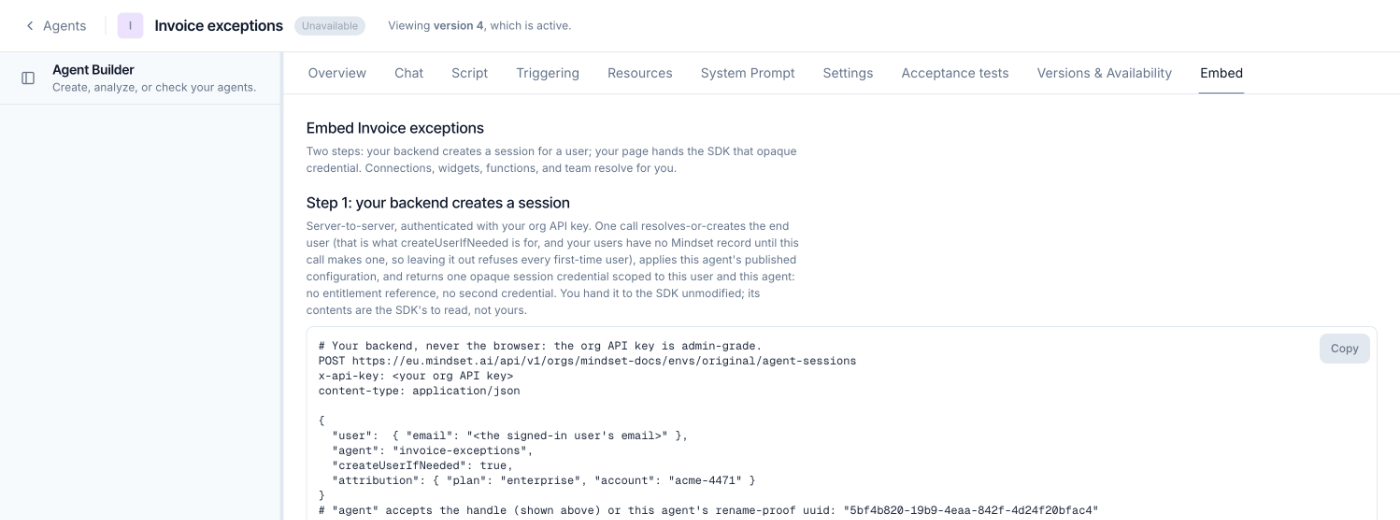
## 1. Add a session endpoint
A complete Express server for Node 18 or later, with `"type": "module"` in `package.json`. Any server stack works the same way.
```javascript
import express from "express";
const MINDSET_HOST = "https://eu.mindset.ai"; // the host your Embed tab shows
const ORG_SLUG = process.env.MINDSET_ORG_SLUG;
const ENV_SLUG = process.env.MINDSET_ENV_SLUG;
const ORG_API_KEY = process.env.MINDSET_ORG_API_KEY;
const app = express();
// Your own sign-in middleware goes here. This example expects it to set req.user.
app.get("/api/session", async (req, res) => {
if (!req.user) return res.status(401).json({ error: "Not signed in" });
const r = await fetch(
`${MINDSET_HOST}/api/v1/orgs/${ORG_SLUG}/envs/${ENV_SLUG}/agent-sessions`,
{
method: "POST",
headers: {
"x-api-key": ORG_API_KEY,
"content-type": "application/json",
},
body: JSON.stringify({
user: { email: req.user.email },
agent: "billing-help",
createUserIfNeeded: true,
}),
},
);
if (!r.ok) {
console.error("Mindset session create failed", r.status, await r.text());
return res.status(502).json({ error: "Could not start a session" });
}
// Forward the whole body, unchanged.
res.set("cache-control", "no-store").json(await r.json());
});
app.listen(3000);
```
- **`createUserIfNeeded: true`** creates a Mindset user the first time one of yours shows up. Without it, every first-time user gets a 404.
- **`no-store`** stops a shared cache handing one user's session to another.
- **Forward the body whole.** It holds the credential and the switched-on release features. Rebuilding it as `{ session }` drops the features without an error.
[Session API](https://docs.mindset.ai/docs/session-api) has every field, including identifying users by your own ID.
> **Danger:** The org API key stays on your server. Never put it in a response body, a page or a log line.
## 2. Put the agent on the page
```html
```
The element draws nothing until `configure()`, which asks your backend for a session at once, so call it when the user can see the agent. The SDK calls `getSession` again whenever it needs a fresh session, so you write no refresh logic. The element fills its parent's height, at least 24rem, and renders in a shadow root, so your CSS and its CSS don't reach each other. [Layout and theming](https://docs.mindset.ai/docs/layout-and-theming) covers sizing and colors.
## 3. Check it works
Load the page, send a message and get a reply. If nothing appears, open the browser console: the element logs every problem there and raises it as `mindset:error` with a stable `code`. [Errors and resilience](https://docs.mindset.ai/docs/errors-and-resilience) maps each code and HTTP status to its fix.
## React 19
React 19 renders custom elements directly, so there is no wrapper package. Load the script once in `index.html` and use the tag in JSX. This component configures once, resumes a stored conversation, and reports the conversation ID and errors.
```tsx
import { useEffect, useRef, type HTMLAttributes, type Ref } from "react";
type MindsetAgentElement = HTMLElement & {
configure(config: {
getSession: () => Promise;
conversationId?: string;
conversationList?: boolean;
}): void;
};
declare module "react" {
namespace JSX {
interface IntrinsicElements {
"mindset-agent": HTMLAttributes & {
agent?: string;
ref?: Ref;
};
}
}
}
async function getSession() {
const r = await fetch("/api/session");
if (!r.ok) throw new Error("Could not start a session");
return r.json();
}
type Props = {
conversationId?: string;
onConversation: (conversationId: string) => void;
};
export function BillingAgent({ conversationId, onConversation }: Props) {
const ref = useRef(null);
const configured = useRef(false);
const onConversationRef = useRef(onConversation);
onConversationRef.current = onConversation;
useEffect(() => {
const el = ref.current as MindsetAgentElement | null;
if (!el) return;
const handleConversation = (e: Event) => {
const detail = (e as CustomEvent<{ conversationId: string }>).detail;
onConversationRef.current(detail.conversationId);
};
const handleError = (e: Event) => {
const detail = (e as CustomEvent<{ code: string; message: string }>).detail;
console.error("Mindset error:", detail.code, detail.message);
};
el.addEventListener("mindset:conversation", handleConversation);
el.addEventListener("mindset:error", handleError);
// StrictMode runs this effect twice in development. Configure once.
if (!configured.current) {
configured.current = true;
el.configure({
getSession,
conversationList: true,
...(conversationId ? { conversationId } : {}),
});
}
return () => {
el.removeEventListener("mindset:conversation", handleConversation);
el.removeEventListener("mindset:error", handleError);
};
}, []);
return ;
}
```
- **Guard `configure()`.** Under ``, React runs each effect twice, and each `configure()` creates a session. The `configured` ref keeps it to one.
- **Pass `conversationId` to `configure()`, never as a JSX attribute.** The element writes its own `conversation-id` attribute, and a re-render could write a different value back.
- **Keep `agent` fixed.** Changing it after `configure()` raises `stale-configuration`. To switch agents, render a new component with a changed `key`.
Store the ID `onConversation` receives against the signed-in user, and pass it back as `conversationId` next visit. [The mindset-agent element](https://docs.mindset.ai/docs/the-mindset-agent-element) covers resuming and the conversation list.
## Vue 3
Tell Vue's compiler the tag is a custom element. With Vite, in `vite.config.ts`:
```typescript
import { defineConfig } from "vite";
import vue from "@vitejs/plugin-vue";
export default defineConfig({
plugins: [
vue({
template: {
compilerOptions: {
isCustomElement: (tag) => tag === "mindset-agent",
},
},
}),
],
});
```
Then configure the element once it's mounted:
```vue
```
The React rules apply here too. Without Vite, set the option in your build tool's Vue plugin.
## Load the script on first open
The drop-in script is about 1.5 MB. If most visitors never open the chat, load it on the first open:
```javascript
const SDK_URL = "https://eu.mindset.ai/sdk/mindset-agent.js";
let sdkReady;
function loadMindsetSdk() {
sdkReady ??= new Promise((resolve, reject) => {
const script = document.createElement("script");
script.src = SDK_URL;
script.onload = () => resolve(customElements.whenDefined("mindset-agent"));
script.onerror = () => {
sdkReady = undefined;
reject(new Error("The Mindset SDK could not be loaded"));
};
document.head.appendChild(script);
});
return sdkReady;
}
async function openChat() {
await loadMindsetSdk();
const agent = document.createElement("mindset-agent");
agent.setAttribute("agent", "billing-help");
document.querySelector("#chat").appendChild(agent);
agent.configure({
getSession: async () => {
const r = await fetch("/api/session");
if (!r.ok) throw new Error("Could not start a session");
return r.json();
},
});
}
document.querySelector("#open-chat").addEventListener("click", openChat, { once: true });
```
Load it from your Mindset host, since the element fetches charts and fonts from the same address. With a nonce-based [content security policy](https://docs.mindset.ai/docs/content-security-policy), set `script.nonce` before appending it. In React or Vue, call `loadMindsetSdk()` before rendering the component that holds the tag.
## Before you ship
- **Load the script once per page**, and never add `mindset-agent-charts.js` yourself. A second copy logs a tag collision error. See [SDK versions and updates](https://docs.mindset.ai/docs/sdk-versions-and-updates).
- **Allow the Mindset host** in your [content security policy](https://docs.mindset.ai/docs/content-security-policy), if your site sends one.
- **Every page load starts a fresh conversation** unless you pass back a `conversationId`.
> **Warning:** A scripted agent's greeting, cards, phases and questions appear only in the element. To draw your own interface instead, see [Use your own UI](https://docs.mindset.ai/docs/use-your-own-ui).
## See it working
**Live demo:** [Plain HTML counter](https://docs.mindset.ai/demos/ferrier). A hardware store’s hand-made website mounts its counter with one script tag and one element.
**Live demo:** [Conversation list](https://docs.mindset.ai/demos/orbit). A returning customer reopens an earlier conversation about the same order instead of starting again.