Introduction
Mindset AI provides the Chat SDK to embed the AI agent Component into your web application or portal. This documentation provides the technical instructions and important points in order to achieve that..Before embedding an agent, you need to create the agent and set it up.
There are 2 ways to create an agent:
There are 2 ways to create an agent:
- Through the App administration portal: (see Creating Agents from the portal)
- Using the Agents API
You may then probably need to create
Contexts and upload source files (PDF, Video, Doc, …) called Context Files. There are 2 ways to do that:- Through the App administration portal: (see Knowledge contexts)
- Using the Contexts API and ContextFiles API
Finally, you may have to give your agent access to the created
Contexts, given your own users’ and tenants’ roles and permissions system.- Read more about Agent and Knowledge Context Provisioning
Embedding the AI Agent
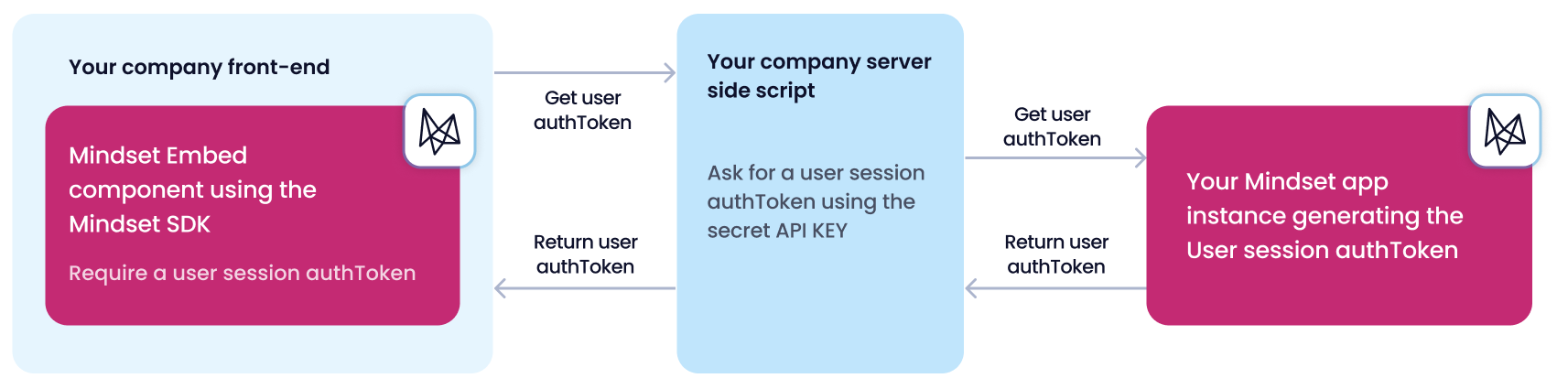
Regardless of whether your agent uses authenticated or anonymous access, there is one Front-end script to integrate. In the case that your agent uses the authenticated access (default mode), there is an additional Back-end authentication script to integrate, which is in charge of getting an authentication token from the Mindset AI system.