

Default agent system
With the default agents system, your Mindset App admin dashboard manages access permissions for knowledge contexts assigned on an agent basis. Learn more about knowledge contexts and default agents system.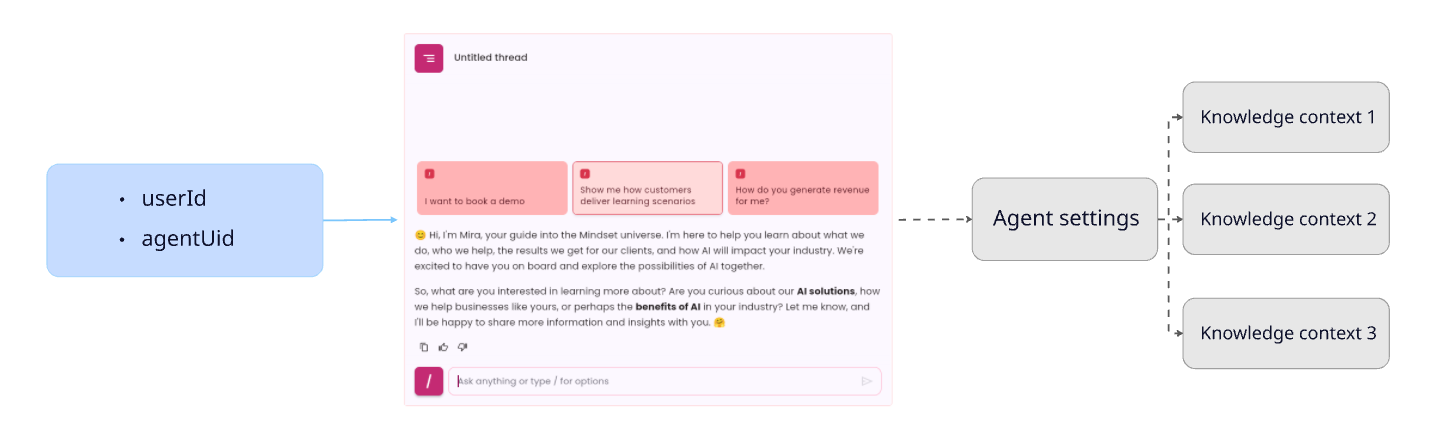
Knowledge Context Provisioning System
You may need to provision agents and knowledge contexts access based on the permission system set up in your platform. We’ve introduced the concept of an agent session: Agent sessions are programmatically provisioned on-demand for specified agents and knowledge contexts. Once an agent session is created, providing theagentSessionUid to the <mindset-agent> HTML tag will allow you to embed the agent with the specified access permissions.
Learn more about AgentSession and Multi-tenancy.
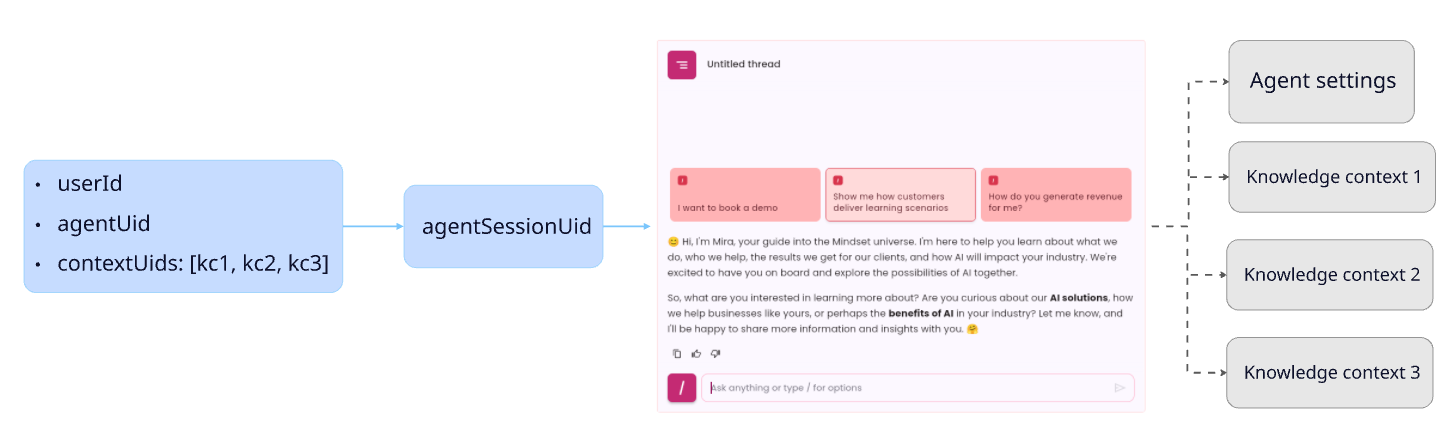
Tutorial : Create agent sessions and embed an agent with provisioned knowledge contexts
Required parameters
You will need to get a few parameters before starting. YOUR-APP-UID is provided by the Mindset support team. All others parameters can be found in the Mindset Management Portal.Step 1: Create an agent session
To create an Agent Session (and hence generate anagentSessionUid required by the SDK), you will need to call the Mindset agentSessions API. (See the Agent Sessions API documentation for more details).
You would need to manage multiple agents, knowledge contexts and users on your platform.According to your permissions and roles system,
users would have specific rights to access specific agents and specific Knowledge contextsFor example:- A
User1has the permission to use theagent1provisioned with theKnowledge Context 1andknowledge context 2. - But a
User2has the permission to use theagent1provisioned with theKnowledge Context 1
agent sessions.- to provision the agent (
agentUid v8srU0hv88BeWBDcirSm) - with the 2 knowledge contexts (
contextUids [qZJGsjytbM5fL15sfBui,3am8rolEPXx3j0n132Bf]) - and for a user with an
externalUserId(user-x123456).
agentSessionUid (v8srU0hv88BeWBDcirSm::uFKbuW0ipk2Za4QuQ6rx).Step 2: Embed the agent in your web application
You embed this agent using the same method that you used to embed the default agent. You will use the<mindset-agent> HTML tag in your Front-end page:
agentUid you will provide the agentSessionUid you just created in the previous step.
The final HTML tag will look like this:
Agent Session Access Duration
Agent Sessions are intended to be generated on demand each time you create a web page that contains an embedded agent. They become inactive after 31 days of non-use. They can also be deactivated immediately using the API. We expect that you will create multiple agent sessions for the same user with identical agent and context details. Please refer to the Agent Sessions API documentation for more details on how to manage agent sessions.Reporting
Here’s how to set up reporting for agents. When creating an agent session through the API, you can provide tags to the parmaters:Back-end and Front-end scripts full example
Back-end script
Sample back-end script (using express). It shows 2 end-points you can implement:/api/getusertokenwhich authenticate the user with Mindset system and returns anauthToken/api/getagentsessionuidwhich create an agent session and returns theagentSessionUid
Front-end script
A sample front-end script which:- Provide a
getAuthToken()method using your/api/getusertokenend-point. - Provide a
getAgentSessionUid()method using your/api/getagentsessionuidend-point. - Build the
<mindset-agent>html tag by passing theagentSessionUidreturned. - call
mindset.init()